New Features
What is new: Fixed an issue that prevented the user from opening a selected template in Dynamics 365 (highlighted in yellow)

User impact: In the DocumentsCorePack Settings, a general user can select “(None)” as a Default App (see Figure 2).
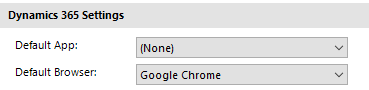
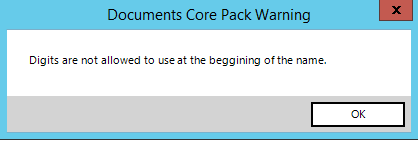
What is new: Validation has been added to prevent users from entering digits at the beginning of a prompt name.
User impact: A “pop-up” dialog will now be shown and any digits in a prompt name will be removed (see Figure 3).
What is new: A new notification is added and will be shown if the user does not have enough security roles to use DocumenntsCorePack.
User Impact: If a user does not have enough security roles and wants to use DCP, this message text now appears: “Check if the current user has all security roles to access CRM data!”
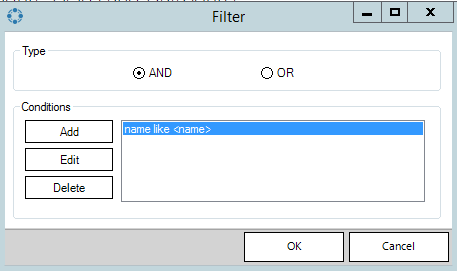
What is new: If “Column Compare” is selected, then the value will be displayed in angle brackets like this “<…>”
User Impact: User will see the selected value in brackets like in the following example:
What is new: The drop-down list has been improved.
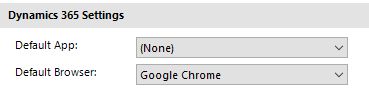
User Impact: DocumentsCorePack Settings “General“-User can select “(None)” for the Default App (see Figure 5).
Bugfixes:
Overview: If the Default App was selected in the DocumentsCorePack-settings, users could not open a template in Dynamics via the “Open Template”-dialog.
User impact: The user could not choose “None” as an option for the Default App.
Overview: When the user enters the name for the prompt, they were allowed to enter digits at the beginning of the name.
User impact: Due to the digits at the beginning of the name, the user could not merge a template in Dynamics 365.
Overview: Groups could be hidden after renaming a template in the Open/Save Template dialog, preventing the user from finding the group.
User Impact: This issue has been fixed. If a group is hidden, the user must create a new group and add their templates again.
Overview: Column compare was not displayed in the description
User Impact: User could not see the values they selected
Overview: It was not possible to select an empty value in the DefaultApp setting.
User Impact: User could not select an empty value in the DefaultApp setting
Overview: The quote character <‘> in the compare value field was duplicated when the condition was edited. As a result, the compare value with the duplicated quote character would not match, and the condition would not return true for this specific case.
User Impact: When editing the condition, the quote is no longer duplicated.
Overview: When a “Static Document“-field was inserted into a table, an issue could occur where the result document was corrupted or the content of the “Static Document” was not added to the result document.
User Impact: The content is now properly added without the new line
Overview: The option “External Image” in the “Picture Field“-dialog was not set when using a field from the standard (document) query. As a result, the image wasn’t loaded from SharePoint.
User Impact: The “External Image” option can now be set in the standard query.
Overview: When a document was loaded from one SharePoint subsite and then saved to another, it resulted in an “Access denied“-error.
User Impact: A document can now be loaded from and saved to different SharePoint subsites/contexts.
Overview: The “CoverLetter“-tab was not displaying in certain situations
User Impact: Is minimal (only legacy users)
Overview: The number of months in a calculation would not be calculated correctly.
User Impact: The calculation logic has been fixed.
Overview: With some languages (e.g. HU), SharePoint libraries would not be recognized correctly if the location name included characters where the upper and lowercase versions of that character is not invariant (CK)
User Impact: New folders with lowercase names would be created for already existing SharePoint locations